









































Please install KubeStash to try this feature. Database backup with KubeStash is already included in the KubeDB license. So, you don’t need a separate license for KubeStash.
New to KubeDB? Please start here.
ClickHouse Backup & Restore Overview
KubeDB uses KubeStash to backup and restore databases. KubeStash by AppsCode is a cloud native data backup and recovery solution for Kubernetes workloads and databases. KubeStash utilizes a ClickHouseBackup driver (based on clickhouse-backup) to securely backup ClickHouse databases to any cloud or on-prem storage backend (for example, S3, GCS, Azure Blob storage, Minio, NetApp, Dell EMC etc.).
How Backup Works
The following diagram shows how KubeStash takes backup of a ClickHouse database. Open the image in a new tab to see the enlarged version.
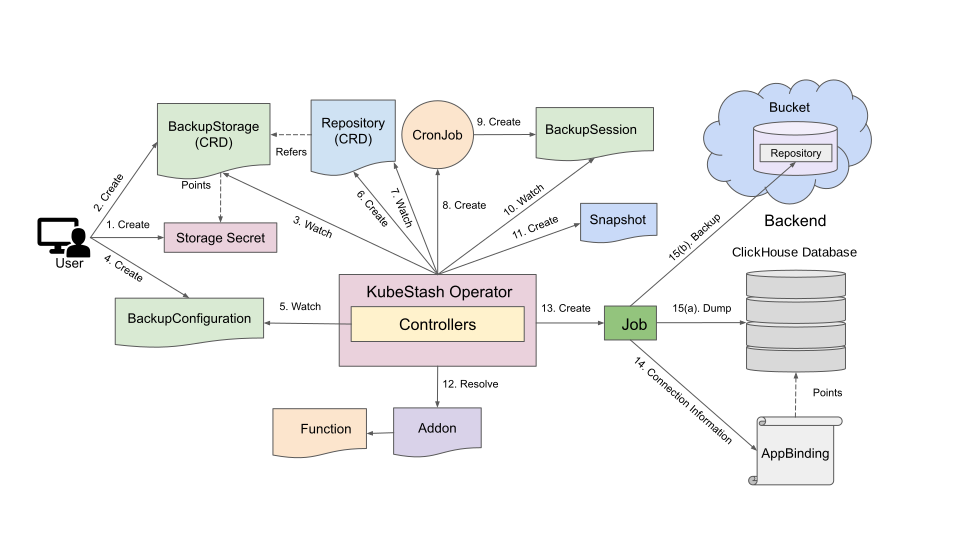
The backup process consists of the following steps:
At first, a user creates a
Secret. This secret holds the credentials to access the backend where the backed up data will be stored.Then, she creates a
BackupStoragecustom resource that specifies the backend information, along with theSecretcontaining the credentials needed to access the backend.KubeStash operator watches for
BackupStoragecustom resources. When it finds aBackupStorageobject, it initializes theBackupStorageby uploading themetadata.yamlfile to the specified backend.Next, she creates a
BackupConfigurationcustom resource that specifies the targetClickHousedatabase, addon information (including backup tasks), backup schedules, storage backends for storing the backup data, and other additional settings.KubeStash operator watches for
BackupConfigurationobjects.Once the KubeStash operator finds a
BackupConfigurationobject, it creates aRepositorywith the information specified in theBackupConfiguration.KubeStash operator watches for
Repositorycustom resources. When it finds theRepositoryobject, it initializes theRepositoryby uploading arepository.yamlfile into thespec.sessions[*].repositories[*].directorypath specified inBackupConfiguration.Then, it creates a
CronJobfor each session with the schedule specified inBackupConfigurationto trigger backup periodically.KubeStash operator triggers an instant backup as soon as the
BackupConfigurationis ready. Backups are otherwise triggered by theCronJobbased on the specified schedule.KubeStash operator watches for
BackupSessioncustom resources.When it finds a
BackupSessionobject, it creates aSnapshotcustom resource for eachRepositoryspecified in theBackupConfiguration.Then it resolves the respective
AddonandFunctionand prepares backupJobdefinition.Then, it creates the
Jobto backup the targetedClickHousedatabase.The backup
Jobreads necessary information (e.g. auth secret, port) to connect with the database from theAppBindingCR. It also reads backend information and access credentials fromBackupStorageCR, Storage Secret andRepositorypath respectively.Then, the
Jobrunsclickhouse-backupagainst the targetedClickHousedatabase and uploads the output to the backend.After the backup process is completed, the backup
Jobupdates thestatus.components[dump]field of theSnapshotresource with backup information of the targetClickHousedatabase.
How Restore Process Works
The following diagram shows how KubeStash restores backed up data into a ClickHouse database. Open the image in a new tab to see the enlarged version.
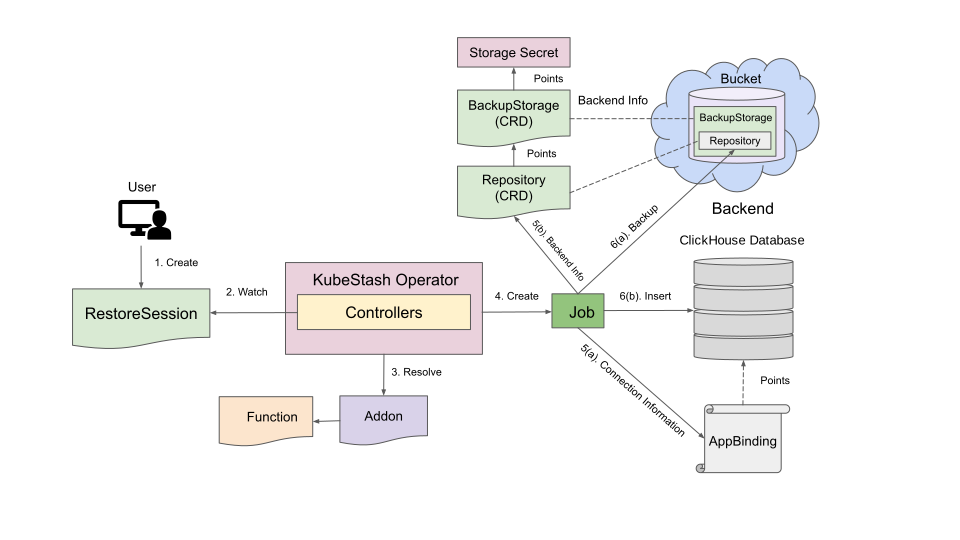
The restore process consists of the following steps:
At first, a user creates a
ClickHousedatabase where the data will be restored, or the user can use the sameClickHousedatabase.Then, she creates a
RestoreSessioncustom resource that specifies the target database where the backed-up data will be restored, addon information (including restore tasks), the target snapshot to be restored, the Repository containing that snapshot, and other additional settings.KubeStash operator watches for
RestoreSessioncustom resources.When it finds a
RestoreSessioncustom resource, it resolves the respectiveAddonandFunctionand prepares a restoreJobdefinition.Then, it creates the
Jobto restore the target.The
Jobreads necessary information to connect with the database from the respectiveAppBindingCR. It also reads backend information and access credentials fromRepositoryCR and storageSecretrespectively.Then, the
Jobdownloads the backed up data from the backend and restores it into the desiredClickHousedatabase usingclickhouse-backup.Finally, when the restore process is completed, the
Jobupdates thestatus.components[*]field of theRestoreSessionwith restore information of the target database.
Next Steps
- Backup a
ClickHousedatabase using KubeStash by following the guide from here.